Press Start Co

Dual Monitor Arms

The three numbers that decide whether an arm fits your desk and your screens.

By Stephen V., Founder & Editor · Last updated September 6, 2026 · How we pick

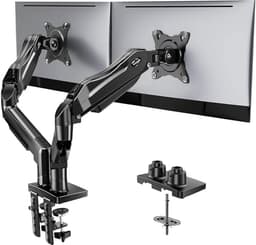
HUANUO FlowLift Dual Monitor Stand product photo

Top pick

HUANUO FlowLift Dual Monitor Stand

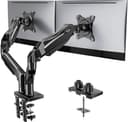
Gas spring, a 13 to 32 inch range, 19.8 lbs per arm, and both a clamp and a grommet base in the box - it fits more desks and more monitors than the cheaper arms.

$59.99 · View on Amazon
$69.99-14%
#ad · Price as of September 14, 2026 · Disclosure

Four dual monitor arms, compared

Compared on the three things that actually decide fit: per-arm weight rating, screen size range and how it attaches to the desk. Prices are live from Amazon.

#ItemBest forBracketPrice
1
HUANUO FlowLift Dual Monitor Stand product photo
HUANUO FlowLift Dual Monitor Stand
Monitor arm
The best all-round dual arm: gas spring, big size range, both mounting options.Mid-range$59.99
2
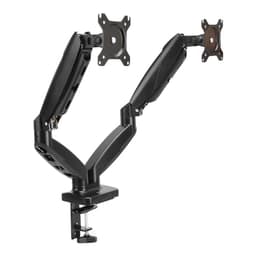
Amazon Basics Gas Spring Dual Monitor Arm product photo
Amazon Basics Gas Spring Dual Monitor Arm
Monitor arm
Two ordinary 24 inch panels, at the lowest price a gas-spring arm sells for.Budget$44.99
3
VIVO STAND-V002O Dual Monitor Stand product photo
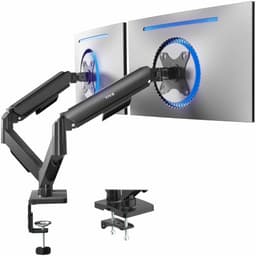
VIVO STAND-V002O Dual Monitor Stand
Monitor arm
Larger screens on a budget, if you rarely move them once they are set.Budget$49.99
4
Ergotron LX Vertical Stacking Dual Monitor Arm product photo
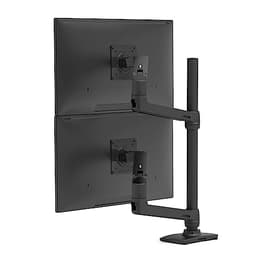
Ergotron LX Vertical Stacking Dual Monitor Arm
Monitor arm
Heavy or very large panels, stacked vertically, on a desk too narrow to sit them side by side.Premium$479.99

Three numbers decide whether an arm works. Everything else is styling.

A monitor arm is the highest-ticket item in a dual-screen setup and the one people most often get wrong, because the listings are full of specifications and only three of them determine whether the thing you ordered will hold your screens on your desk. Check these before anything else.

1. The weight rating, per arm, against the monitor's net weight

This is the one that causes returns. Two mistakes hide inside it.

The rating is per arm, not combined. An arm advertised for two 19.8 lb monitors holds 19.8 lbs on each side. Reading that as a combined figure will have you reject an arm that would have been fine, or - worse - trust a total that was never offered.

The weight that matters is the panel without its stock stand.The number on the box is usually shipping weight, which includes the stand, the packaging and often the cables. The stand is frequently the heaviest single part of a monitor and you are about to remove it. Find the manufacturer's listed weight for the display head on its own; that is the figure to compare.

There is a minimum as well, which almost nobody checks. A gas-spring arm is a calibrated spring, and a monitor lighter than its minimum will drift upward instead of holding position. Very light 24 inch panels can fall under the minimum on heavy-duty arms - which is exactly why the most expensive arm on this page is the wrong choice for two ordinary office monitors.

2. The VESA pattern

VESA is the standardized grid of four screw holes on the back of a monitor, quoted in millimeters between hole centers - 75x75 and 100x100 cover the overwhelming majority of desktop displays, and every arm below supports both. Two things to confirm anyway.

First, that your monitor has VESA holes at all. Some consumer panels, particularly slim and curved ones, ship without them or hide them behind a cover that has to come off. If the product listing does not say VESA, assume it does not have it.

Second, if you need an adapter plate to make an unusual monitor fit, remember the adapter has weight of its own and does not raise the arm's capacity. Add the plate to the panel and check the total against the per-arm rating.

3. How it attaches to your desk

Arms mount one of two ways. A C-clamp grips the back edge of the desk and needs an edge it can actually get around - a certain thickness, no thick lip or overhang, and clearance underneath. A grommet mount bolts through a hole in the desk surface, which is more solid but requires a hole to exist or be drilled.

Measure the desk before ordering. The failure case here is thin laminate or a hollow-core desk that flexes or dents under clamp pressure, and it is not a fault in the arm. If your desk has a back lip or a cable channel where the clamp needs to sit, look specifically for an arm that ships both mounting options - the top pick here does, which is a large part of why it is the top pick.

Gas spring or mechanical?

Gas spring arms counterbalance the monitor so it holds wherever you move it, with one hand and no tools. If you re-angle screens regularly, share the desk, or ever stand up while working, this is worth the money.

Mechanical or spring-free arms use friction joints you loosen and re-tighten. They are cheaper, they carry more weight for the price, and they are perfectly good if the monitors go into position once and stay there. The VIVO option below is the value play for exactly that situation - two large panels, set and forgotten.
Before you buy

Weigh the monitor, not the box.If you take one thing from this page: the specification you are checking against the arm's per-arm rating is the display head's own weight with the stock stand removed, from the manufacturer's specification sheet. Shipping weight includes the stand and the packaging and can be several pounds higher, which will either make you buy a much more expensive arm than you need or - if you guess low - leave you with two screens that slowly sag over a month.

The picks, in depth

1
HUANUO FlowLift Dual Monitor Stand product photo

HUANUO FlowLift Dual Monitor Stand

Monitor armHUANUOMid-range

Best for: The best all-round dual arm: gas spring, big size range, both mounting options.

Gas spring, fits 13-32 inch, VESA 75x75 and 100x100, 4.4-19.8 lbs per arm, C-clamp and grommet mounts included

This is the arm to buy if you want one purchase to cover whatever monitors you own now and whatever you replace them with. It combines the things the cheaper arms each miss: gas-spring movement, a 13-32 inch range, a 19.8 lb per-arm rating, and both a C-clamp and a grommet base in the box so it fits a desk with a back lip or a solid rear edge.

The catch: Still a clamp mount, so it needs a desk edge it can actually grip - check your desk is thick enough and not a thin laminate overhang before ordering. Heavy 32 inch panels near the 19.8 lb limit will sag over months on any arm in this price class.

Specification and availability taken from the retailer's product listing, checked September 6, 2026. Price is live and stamped under the button.

$59.99 · View on Amazon
$69.99-14%
#ad · Price as of September 14, 2026 · Disclosure
2
Amazon Basics Gas Spring Dual Monitor Arm product photo

Amazon Basics Gas Spring Dual Monitor Arm

Monitor armAmazon BasicsBudget

Best for: Two ordinary 24 inch panels, at the lowest price a gas-spring arm sells for.

Gas spring, fits 15-27 inch, supports 4.4-15.4 lbs per arm, VESA 75x75 and 100x100, desk clamp

A gas-spring arm holds position when you move it instead of needing to be re-tightened, and this is about the cheapest place that feature exists. For two 24 inch 1080p panels - which is what most dual setups actually are - the 15.4 lb per-arm rating and the 15-27 inch size range are comfortably enough.

The catch: The 15.4 lb per-arm limit and the 27 inch ceiling rule out most 32 inch and curved panels. Check your monitor's net weight without its stock stand, not the shipping weight on the box, before you order.

Specification and availability taken from the retailer's product listing, checked September 6, 2026. Price is live and stamped under the button.

$44.99 · View on Amazon
#ad · Price as of September 14, 2026 · Disclosure
3
VIVO STAND-V002O Dual Monitor Stand product photo

VIVO STAND-V002O Dual Monitor Stand

Monitor armVIVOBudget

Best for: Larger screens on a budget, if you rarely move them once they are set.

Mechanical articulating (spring-free), fits 17-32 inch, VESA 75x75 and 100x100, max 19.8 lbs

The cheap way to mount two big panels. It takes screens up to 32 inch and up to 19.8 lbs, which is more headroom than the gas-spring budget arms, and the mechanical joints hold heavy monitors without a spring to fight.

The catch: Spring-free means you adjust it by loosening and re-tightening knuckles rather than nudging it with one finger. Fine for a set-and-forget desk, irritating if you re-angle screens constantly.

Specification and availability taken from the retailer's product listing, checked September 6, 2026. Price is live and stamped under the button.

$49.99 · View on Amazon
$59.99-17%
#ad · Price as of September 14, 2026 · Disclosure
4
Ergotron LX Vertical Stacking Dual Monitor Arm product photo

Ergotron LX Vertical Stacking Dual Monitor Arm

Monitor armErgotronPremium

Best for: Heavy or very large panels, stacked vertically, on a desk too narrow to sit them side by side.

Vertical stacking, for 2 monitors up to 40 inch, 7-22 lbs each, tall pole, VESA desk mount

The reference-grade option, and the only one here rated to 40 inch panels at 22 lbs each. The vertical stacking layout is the reason to choose it over anything cheaper: on a narrow desk, two screens above and below each other is the only arrangement that fits, and this is the arm built for it.

The catch: It costs many times what the other three cost - more than most of the monitors on this page. Unless your panels genuinely exceed the cheaper arms' weight and size limits, or you specifically need vertical stacking, the money is better spent on the screens themselves. It also has a 7 lb minimum, so very light monitors will not hold position.

Specification and availability taken from the retailer's product listing, checked September 6, 2026. Price is live and stamped under the button.

$479.99 · View on Amazon
#ad · Price as of September 14, 2026 · Disclosure

What an arm actually buys you

Two things, and neither is the one people expect.

Desk space. Two monitor stands occupy a surprising amount of the surface directly in front of you - the part you would otherwise use. An arm moves all of that load to the desk edge and gives the space back.

The gap between the screens. Stock stands hold panels apart at a fixed distance and stop them from angling in properly. An arm lets you push the two displays together until the bezels almost touch and angle the second one toward you. That matters more than it sounds on a second screen you are always looking at from the side - it is the difference between glancing at your voice chat and turning your head to it.

When not to buy one

If both monitors are already at a comfortable height, you have desk space to spare, and you never move them, an arm is a genuinely optional purchase and the money goes further on the screens. It is also the wrong first purchase if you have not bought the second monitor yet - decide that first on do you need a second monitor, or price the whole thing up on the budget dual monitor build, which treats the arm as one line item among three.

One case does force it: a desk too shallow for two screens side by side. There the answer is vertical stacking, one panel above the other, and that needs an arm built for it rather than a standard side-by-side model. It is the most expensive option here by a wide margin, so confirm the layout is genuinely necessary before committing.

Where this sits in the wider setup

An arm is a comfort and space purchase, not a capability one - it does not let you do anything you could not do before. If you are choosing between an arm and something else, and your group plays locally, the second controller changes far more for far less. The setup hub puts the whole cluster in buying order.

Frequently asked questions

How do I know if a monitor arm will hold my monitors?+

Compare the arm's per-arm weight rating against your monitor's weight with the stock stand removed - not the shipping weight on the box, which includes the stand and packaging. Check the minimum rating too: a gas-spring arm needs a certain weight to hold position, so a very light panel on a heavy-duty arm will drift upward.

What VESA size do I need for a dual monitor arm?+

Most desktop monitors use either 75x75 or 100x100 millimeters between the mounting hole centers, and arms in this class support both. Confirm your monitor actually has VESA holes first - some slim and curved consumer panels do not, or hide them behind a cover.

Clamp or grommet mount - which is better?+

A C-clamp grips the back edge of the desk and needs a suitable edge with clearance underneath, which is the easier install if your desk allows it. A grommet mount bolts through a hole in the desk and is more solid but needs that hole to exist. If your desk has a back lip or cable channel, buy an arm that includes both options.

Is a gas spring monitor arm worth it over a mechanical one?+

If you adjust your screens regularly, yes - a gas spring holds position wherever you move it with one hand. If the monitors will be set once and left alone, a mechanical spring-free arm is cheaper and usually carries more weight for the money.

Can a monitor arm damage my desk?+

A clamp mount can dent or flex thin laminate and hollow-core desks, which is a desk limitation rather than an arm fault. Check the desk is solid and thick enough at the clamping point before ordering, and use a grommet mount instead if you are unsure and can drill.